NotepadX: A Versatile Chrome Extension for Note-Taking
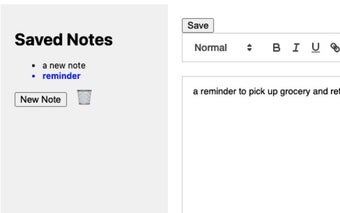
NotepadX is a powerful and versatile Chrome extension developed by EBMarketing. It serves as a go-to notepad for users who want to take notes, compose longer texts, or create lists directly within their browser. With its intuitive interface and rich text formatting features, NotepadX offers a convenient solution for organizing thoughts and ideas.
One of the standout features of NotepadX is its rich text formatting capabilities. Users can easily format their text with options like bold, italics, underlining, different font sizes, colors, and more. This allows for creative expression and effective communication.
Editing notes in NotepadX is a breeze, thanks to functionalities like copy, cut, paste, undo, and redo. Users can effortlessly make changes and organize their notes as desired.
Saving and deleting notes is simple with NotepadX. Users can instantly save their notes within the extension and easily manage their collection by deleting those they no longer need.
NotepadX also offers browser-synced storage, ensuring that all notes are securely stored within the browser. This allows for easy accessibility across different sessions, providing convenience and peace of mind.
To enhance the user experience, NotepadX allows for customization. Users can adjust settings such as themes, font styles, and layout preferences to tailor their notepad experience to their workflow.
Whether you need to jot down quick notes while browsing the web, create to-do lists or reminders, or draft emails, messages, or articles directly within the browser, NotepadX simplifies note-taking and organizing tasks. It offers a seamless and integrated solution for managing thoughts and ideas right from your Chrome browser.